Выручка, продажи без возвратов и количество возвращённых товаров по каждому артикулу.
Финансовый отчёт Ozon
Финансовый отчёт Ozon по каждому товару
Cifroz объединяет начисления Ozon с себестоимостью и показывает, сколько заработал кабинет и каждый SKU после комиссий, логистики, рекламы и возвратов.
First look at the calculation method Cifroz is currently free — no payment or promo code required. You can connect as many Ozon stores as you like. The date of the end of free access is not set; we will inform about the paid conditions in advance. The API is only connected for reading. Current Access Conditions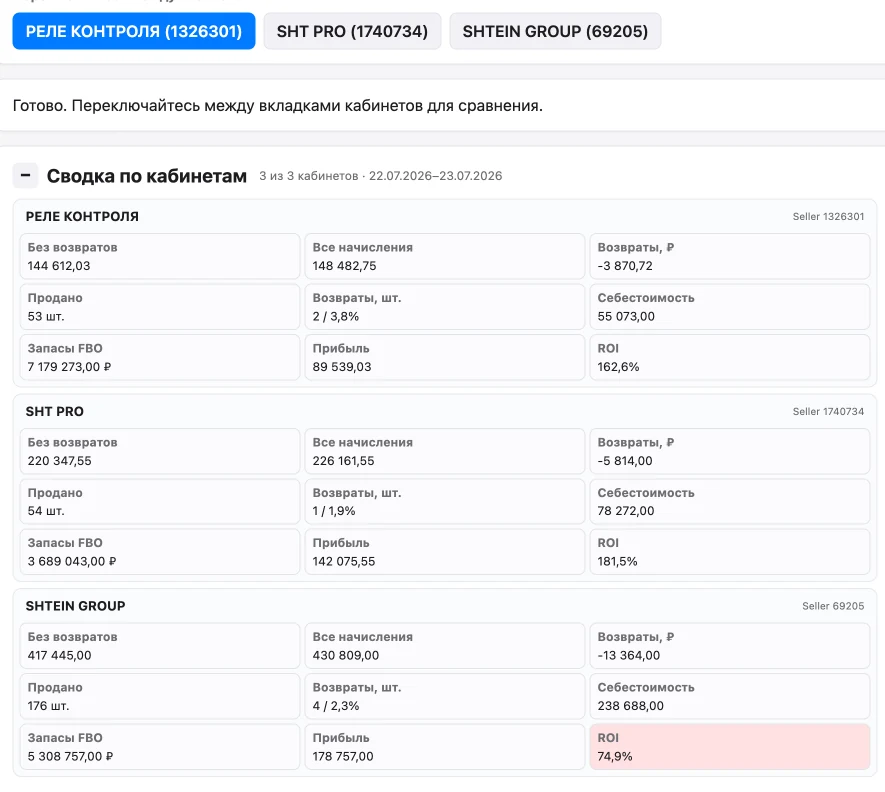
The seller's task
Почему выплата Ozon не показывает прибыль
- Выплата отражает движение денег между Ozon и продавцом, но не учитывает закупочную себестоимость товара.
- Общая сумма по кабинету скрывает прибыльные и убыточные SKU.
- Возвраты, реклама, хранение и общие начисления меняют итог товара в разные даты.
Service capabilities
Что входит в финансовый отчёт Cifroz
Себестоимость проданных единиц, комиссии, логистика и другие начисления Ozon.
Реклама, хранение, прибыль и ROI каждого SKU за выбранный период.
Итоговая сверка потоварных строк с финансовыми начислениями кабинета.
Clear calculation.
Пример: от продажи к прибыли одного SKU
Покупатель оплатил товар за 5 000 ₽. Для примера комиссия Ozon составляет 43%, остальные расходы на логистику, упаковку и возвраты — 1 000 ₽, закупочная себестоимость — 1 000 ₽.
Result5 000 − 2 150 − 1 000 − 1 000 = 850 ₽ прибыли до условного налога
43% — условие примера, а не универсальный тариф Ozon. Для прошедшего периода Cifroz использует фактические начисления продавца.
Methods.
How the result is formed
The calculation is based on the selected period and keeps the reconciliation with Ozon financial data.
Как читать финансовый отчёт Ozon- 1
Загружает доступные финансовые операции, продажи, возвраты и рекламные данные за один период.
- 2
Сопоставляет прямые начисления с артикулами, а общие расходы распределяет по зафиксированной методике.
- 3
Вычитает себестоимость фактически проданных единиц и показывает прибыль, ROI и сверку по кабинету.
Reconciliation before decision
What to check in the financial statement before the purchase and price change
First, the result of the store is checked, then the result of each SKU. The same amount of payout and profit is not a criterion of correctness: these are different indicators.
1. Period and completeness
Record the store, dates and the moment of renewal. Don’t compare one month’s payout to another. If some of the operations have not yet been loaded, the conclusion about the profit is preliminary.
How to Read the Financial Report2. unit cost
Check the availability of the cost of sold SKU. The purchase price is multiplied by the number of units involved; the purchase of the entire batch should not automatically become a monthly sales expense.
What to include in unit cost →3. Returns and expenses
Check the returns and compensation signs. Advertising, storage and logistics should not be deducted twice – within financial transactions and once again from individual unloading.
Where to look for differences4. Goods reconciliation
The sum of the SKU strings, together with the unallocated operations, should explain the result of the store. Set a rule for allocating total costs. Don’t randomly allocate an unknown balance just for the sake of matching amounts.
The Economy of Every SKUExample: Find the unexplained difference
For example, the accruals for the selected period after the deductions were recorded amounted to 120,000 ₽ , and the amount of the corresponding accruals for commodity lines was 117,000 ₽ . The difference of 3,000 ₽ is a signal to find transactions without SKU, date mismatches or missed adjustments. This is not proof of overpayment of the marketplace and not additional profit.
If the cost of the goods sold is 70,000, the preliminary result is 120,000-70,000 = 50,000. It is not yet a net profit if taxes, packaging or other external expenses are not included. All amounts here are conditional; real tariffs should be taken from the charges of your store.
How to Use a Verified Report
After the reconciliation. Do an ABC analysis on earningsCheck the loss-making SKUs and match them with the balances. For the planned price, there is calculatorThe forecast does not replace the actual financial statement.
This checklist is a method of self-checking. It does not mean that Cifroz automatically assigns ABC groups or maintains accounting and tax records.
Разбор: продажи растут, а прибыль снижается
Учебный пример двух месяцев с одинаковым составом товаров. Выручка выросла на 20%, но расходы выросли быстрее. Суммы условные: это не результат клиента Cifroz.
| Показатель | Первый месяц | Второй месяц |
|---|---|---|
| Выручка за вычетом возвратов | 100 000 ₽ | 120 000 ₽ |
| Себестоимость проданных единиц | 40 000 ₽ | 48 000 ₽ |
| Все учтённые расходы Ozon | 45 000 ₽ | 65 000 ₽ |
| Результат до налогов и внешних расходов | 15 000 ₽ | 7 000 ₽ |
120 000 − 48 000 − 65 000 = 7 000 ₽
What to check before deciding
- Сравните одинаковые по длительности завершённые периоды и состав SKU.
- Разложите рост расходов на комиссию, логистику, рекламу, хранение и прочие услуги — общая сумма не показывает причину.
- Проверьте поздние корректировки начислений. Без себестоимости итог нельзя называть прибылью.
Результат в этом примере снизился на 8 000 ₽. Налоги и расходы вне Ozon не заданы, поэтому это не чистая прибыль бизнеса. В демо ниже — отдельный сохранённый пример интерфейса, не эти учебные цифры.
Free access
Connect the Ozon store and check your metrics.
Access is opened after registration, without payment and promo code. The number of connected stores is not limited. For the report, you need the Seller API keys and the filled cost of goods. First, you can watch the demo – without registration and API keys.
- 1
Create an account, specify an email and phone, confirm the mail.
- 2
Connect the Ozon Seller API with Admin Read Only permissions by specifying the Seller Client ID of your account.
- 3
Сверьте выручку, себестоимость, начисления Ozon, прибыль и ROI каждого SKU за выбранный период.
Questions and answers
Частые вопросы о финансовом отчёте Ozon
Что показывает финансовый отчёт Ozon?
Отчёт показывает начисления маркетплейса за выбранный период: продажи, комиссии, логистику, возвраты, услуги и другие операции. Для расчёта прибыли к ним нужно добавить себестоимость и внешние расходы бизнеса.
Почему выплата Ozon не равна прибыли?
Выплата показывает движение денег, а прибыль учитывает себестоимость товара, рекламу, налоги и другие расходы, которые могут не входить в перечисление маркетплейса.
Можно ли увидеть прибыль по каждому товару?
Да. Для этого финансовые операции нужно сопоставить с SKU, добавить себестоимость проданных единиц и распределить общие расходы по постоянному правилу.
Какие показатели сравнивать между периодами?
Сравнивайте выручку, прибыль, ROI, долю расходов, возвраты и себестоимость на одинаковых временных интервалах и при одинаковой методике распределения затрат.
Cifroz
Начать бесплатно
Check your store's readings.
Create an account, connect the Ozon API and fill the cost of goods. Now the service is free - without promo code and payment.